
While motorists scramble to get dashcams fitted to their cars, fleet operators are faced with a decision on whether to do the same. It’s true that dashcams boost safety, but fleet managers have WAY more choices and features to consider before implementing them into their vehicles.
So how do you decide?
ResearchGate found that from a pool of road accidents analysed between 2010 and 2017, 17% of them were caused by sudden & unexpected lane changes, while 11.2% were a result of tailgating.
Could fleet dashcams have prevented some of these crashes?
Cartrack has provided road safety solutions for over two decades, and we’re embracing AI’s role in preventing fleet-related accidents in a BIG WAY. This guide has everything you need to know for making the best dashcam purchasing choices.
In order to find the best dashcam solution for your business, you first need to understand the options that are out there. For the purposes of this guide, Cartrack has divided dashcam solutions into 5 “levels” of security. You might need something basic, or perhaps something more advanced. Here are your options.
But first…
Important note on Cartrack fleet dashcams: The baseline for ALL our fleet cameras included here are:
So no matter which option you choose, you’ll get everything listed above! 😄
Whether you have a fleet of 2 vehicles or 50, a basic dashcam for each vehicle is the bare minimum safety measure you should take. This is a road-facing dashcam (similar to the ones motorists get installed) and will give you helpful footage of the road ahead if & when something eventful happens.
Dashcams and GPS tracking were meant to go together. When you combine GPS tracking with your vehicle cameras, you open up a number of excellent telematics opportunities like route optimisation, stolen vehicle recovery, and useful data reporting.
As noted earlier, a significant portion of road accidents can be attributed to tailgating. This is when another vehicle rear-ends your vehicle because they were following too closely. Dual-vision fleet dashcams solve this by providing rear-view footage in addition to road-facing.
If one of your vehicles gets rear-ended, you’ll know why, which is immensely helpful during the claims process.
The backward-facing camera also has night vision, so your vehicles are protected at night and while driving through tunnels or under bridges.
This is where things really get interesting. Fleets like yours get loads of benefits from using advanced AI integration with their dashcams. It’s true that all of Cartrack’s dashcams come with some level of AI, but our AI Dash Pro option gives you a much more comprehensive selection.
This selection focuses on driver monitoring and coaching. Standard features include the ability to call your driver in real time if you need to correct their behaviour, and live-streaming of the camera footage on your PC or mobile device.
You’ll also get to manually download any recent footage you think might be useful for training purposes, and our AI will gratuitously organise valuable data to give you an overview of your operations. This overview helps you make better decisions as a fleet manager and will boost your training efforts like nothing else!
Finally, this fleet dashcam has audible AI alerts that correct your drivers as soon as they display potentially dangerous driving behaviour. It’s a good way to remind them to stay on the proverbial track while driving one of your vehicles.
For fleets who take safety and decision-making seriously, Cartrack offers one of the most comprehensive fleet dashcam packages known to the industry. This advanced package gives you all-but-one of the features already mentioned above, along with the option of multiple dashcam installations inside & outside the vehicle.
With these extra camera installations, you get the option to display blind spots to your drivers via an in-cab monitor. You’ll also get our state-of-the-art driver monitoring system, which excludes in-cab calling for multiple installations (because the AI does all the correcting for you through its audio alerts!)
In addition to all this, you get all the telematics and high-quality data you need to make the best decisions as a fleet manager. Plus, you’ll receive advanced reporting for showing your stakeholders WHY you made those decisions.
This package comes with single-camera installations or multiple-camera installations. It all depends on what your fleet needs and how many vehicles you manage. But the best thing about either choice is that all your data is consolidated into one platform, giving you the overview you need to become the most efficient fleet manager!
Important note: While some of these features come as standard built-in tools, others are optional. Speak to a Cartrack consultant to tailor-design the exact package your fleet needs, and avoid paying for features you’ll never use.

Cartrack accommodates multiple dashcam installations for various purposes:
When shopping around for the best fleet dashcam solutions for your business, it’s helpful to understand some of the acronyms used in the industry. Below you’ll find definitions and explanations for common dashcam terms.
LMV stands for Live Multi-Viewing. This refers to a live camera footage feed that gets displayed on your fleet software platform, allowing you to view the footage in real time on your PC or phone.
HCV stands for High-definition Composite Video, sometimes also referred to as HD-CVI (High-Definition Composite Video Interface). This refers to the quality of the video footage your dashcam delivers and often records at a high data-consumption rate.
DMS stands for Driver Monitoring System. If you see DMS included on your dashcam specs, this means it has specially designed features that focus on monitoring your drivers in real time.
ADAS stands for Advanced Driver Assistance System. This is state-of-the-art safety technology that relies on dashcams to keep drivers and their vehicles from catastrophic accidents. It’s mostly used in mining because of the high-stakes nature of that industry.
Included in ADAS technology are other terms worth noting:
A non-road camera is any dashcam fitted to your vehicle that records something other than the road ahead or behind. These are cameras used for blind spot visibility, cargo monitoring, or fuel tank surveillance.
A dashcam event is anything out of the ordinary detected by the dashcam’s native AI. Events are listed further below to give you a full overview of what each event is, why it’s important to record & save, and how it can help you with legal or insurance claims.
In case you’re still a bit hazy on fleet dashcam features, here’s a definition for each one. Use this list to establish what features you need, and which ones your fleet can do without. Once you have an idea of what you need, call us to design a fleet dashcam package that fits your needs.
Night vision uses advanced camera technology to detect objects in dark areas despite bright lights from surrounding objects. This technology is included in all of Cartrack’s non-road cameras.
Live-streaming means you can view the live footage of any dashcam remotely, viewing it on a personal device like a laptop or your smartphone—even if you’re miles away from the driver.
Direct in-cab calling is the ability to contact your driver based on something you noticed on the live footage you just viewed. It lets you talk with the driver to correct behaviour or ascertain the specifics of an alert or event you just became aware of.
When an event is recorded, Cartrack saves it for 2 years in case you ever need to make a remote footage request. This is usually done for training purposes, insurance claims, or legal reasons.
Real-time audio alerts are AI voice notifications for your driver. Example: if your driver happens to forget to fasten their seatbelt, the dashcam will project a voice alert, “No seatbelt detected”, as a reminder to your driver that they need to buckle up.
A dashcam coaching tool takes footage and event data and packages it up neatly for the purposes of training drivers on specific problem areas. It’s also used to incentivise drivers to keep up good driving habits by highlighting positive habits.
Much of your dashcam footage will end up being pretty boring, which is why AI dashcams are designed for commercial use to save footage that’s actually relevant. They do this by continually overwriting mundane footage and only saving & uploading footage when something “out-of-the-ordinary” happens. (Scroll down for a comprehensive definition of each possible dashcam event).
These are cameras used for the sole purpose of preventing cargo or fuel tampering. They’re installed in such a way to constantly monitor activity around your fuel tank or cargo section.
Your dashcam hardware needs to stay intact and should always be in a position to record what it’s there to record. AI tamper alerts notify you if the camera lens is obstructed or if someone is trying to remove or adjust it.
Blind spots make it difficult for drivers to see if it’s safe to change lanes or depart from an idling position. Dashcams can be installed to view these blind spots and show them to your driver via an in-cab monitor.
Telematics is valuable data fed to your fleet management software platform (driver behaviour, route information, fleet vehicle activity, etc.). This information is organised, interpreted, and made actionable so that you can make good decisions on anything related to stats, metrics, or emergencies.
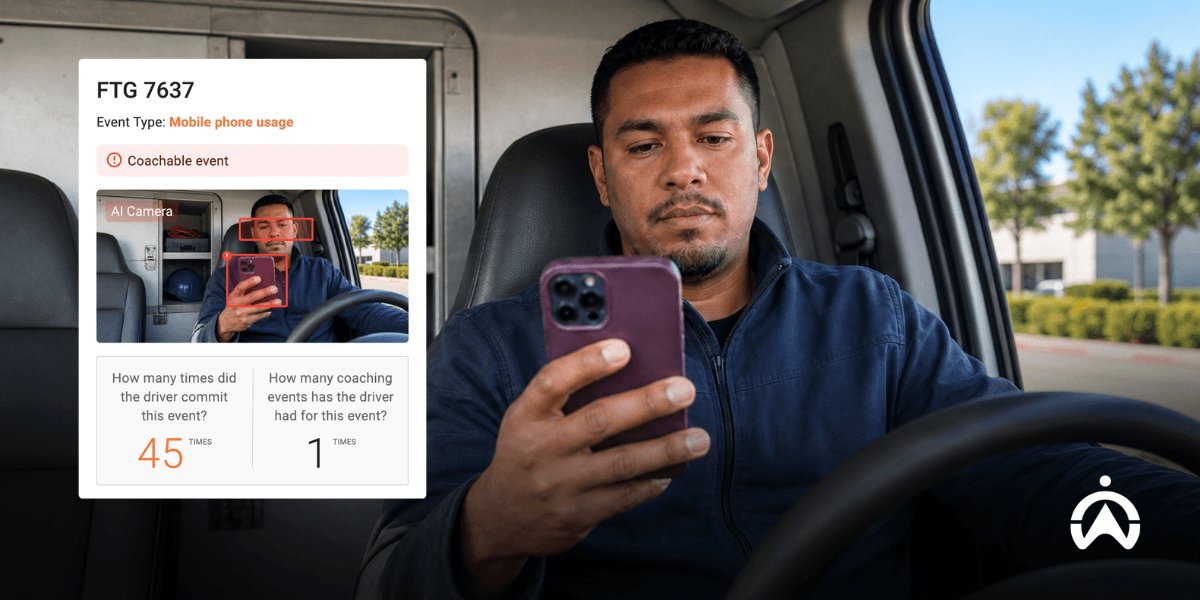
If your dashcam only takes note of pertinent events, it helps to know what those events are. Here’s a full list of the events your dashcam will detect, record, upload, and archive in case you need them.
One of the most helpful events AI fleet dashcams can detect is drowsiness in your drivers. If their eyes show signs of fatigue, rapid blinking, or prolonged periods of being closed, our dashcams will make sure you and your driver are warned!
Eyes darting from side to side, or a head that bends down to look at something on the floor, are signs of distracted driving. AI cameras can detect these signs even if they’re subtle and short-lived.
If a phone is detected anywhere near the driver while they’re operating the vehicle, AI dashcams will make an alert noise to let the driver know that their actions are being recorded.
Depending on your company rules and driver directives, eating, drinking and smoking might be against the rules. If they are, you can adjust your dashcams to detect these actions and record them as events.
Our AI dashcams have reminded countless drivers to buckle up. The AI is so finely acute that it picks up if no seatbelt is detected and quickly allows the driver to remedy the situation.
Cartrack cameras don’t JUST have AI; they also come with various sensors that tell the fleet manager and the driver what’s going on. Combining these detections with recording of footage always gives you the clearest picture of these types of events:
If a driver is focusing on something else, they can very easily cross a road line without even realising it. Because erratic lane changing or veering account for such a significant portion of accidents, our more advanced AI dashcams for fleets also warn drivers when they’re deviating from their lane.
Pedestrian detection is a useful AI fleet dashcam feature for trucks or vehicles that traverse suburban, urban, and rural areas. The dashcam makes a radar-like note of all nearby pedestrians and warns the driver if the vehicle is getting a bit too close for comfort.
The features, events and tech specs you read about in this guide are all options available at Cartrack, making us a top choice for fleet dashcam purchasing.
Simply call a Cartrack consultant to select the package you want, and we’ll quote you based on the nature of your fleet, the number of vehicles you manage, and the features you prefer.

This comprehensive fleet dashcam guide gives you every feature & definition you need to make the best dashcam choices for your fleet’s safety.
%20(4).jpg)
%20(1).jpg)